I Love The Smiths AI Video

Featured trends

I love the smiths

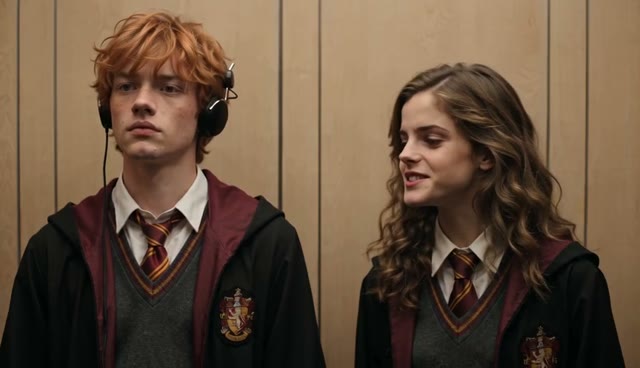
I love the smiths — video frame
Bicep Heart — video frame
AI Giant Dog On Street — video frame
AI Gun Shot — video frame
AI Money Flex — video frame
Coffe Fail — video frame
PSY – Gangnam Style — video frame
Gangsta's Paradise — video frame
Outstanding Tiny Desk AI — video frame
AI Dunk Video — video frame
Alors on Danse AI — video frame
APT AI Video — video frame
Bad Times AI — video frame
Video preview
Bulin 47 AI — video frame
Burning Bridges AI — video frame
Hotel Lobby AI — video frame
iPhone Kupi — video frame
Lamine Yamal 304 dribble — video frame
Ozil AI Goal — video frame
Rumpelstiltskin AI — video frame
Video preview
Topo Gigio AI — video frame
Zombie Couple Video — video frame

Make an I Love The Smiths AI Video Starring You and Your Crush

Step into the 500 Days of Summer elevator scene. Upload one photo of the person in headphones and one of the person who speaks first. Then watch your own meet-cute play out.

How to Make an I Love The Smiths AI Video From Two Photos

Cast both roles, choose your scene length, and generate. You don't need to write a prompt or edit anything.

Cast the listener in headphones

Upload a clear photo for Tom's role, the person on the left listening to music. Their face and outfit guide this character.

Cast the one who speaks first

Upload a photo for Summer's role, the person on the right who notices the song and starts the conversation.

Pick 15s or the full 24s scene

Seedance 2.0 makes a 15-second clip. Seedance 2.5 recreates the full 24-second scene. Pick a resolution and generate your elevator moment, sound included.

AI-generated couple recreating the I Love The Smiths elevator scene

You Two, in the Most Famous Elevator Ride in Rom-Com History

Picture it: the doors close, a song leaks from your headphones, and your crush leans in. Our I Love The Smiths AI video puts both of your faces into the scene, so the shy glance and first words belong to you.

Two people stand side by side in a warm wooden elevator

The Original Scene's Timing and Mood, Starring New Faces

The workflow follows the 500 Days of Summer elevator scene closely: the same movements, pauses, camera angles, lighting, and warm wood-panelled elevator. Only the people change, and they look like the photos you upload. The finished video comes with sound, ready to share.

Two people exchange a smile in an elevator

Make It Sweet, Funny, or Completely Unexpected

Make a soft-launch video with your partner or a shy confession for your crush. You can also make an inside joke with your best friend. Want something sillier? Cast your dog or cat as the listener and watch it stand upright and play the part.

I Love The Smiths AI Video FAQ

What is the I Love The Smiths trend?
It's based on the elevator scene in the 2009 film 500 Days of Summer. Summer hears The Smiths playing through Tom's headphones, says "I love The Smiths," and a shy conversation begins. Fans recreate the moment with themselves, their partners, friends, and even pets.
What song is playing in the elevator scene?
In the film, Tom is listening to "There Is a Light That Never Goes Out" by The Smiths.
How do I make an I Love The Smiths AI video?
Upload two photos. The first is for the listener in headphones (Tom's role) and the second is for the person who speaks first (Summer's role). Then choose a model and resolution and click generate. You don't need to write a prompt.
Which photo goes in which slot?
The first upload becomes the person on the left wearing headphones. The second becomes the person on the right who starts the conversation. Swap the photos to swap the roles.
Can I make the video with my crush, partner, or a friend?
Yes. Upload a photo of yourself and a photo of the other person in whichever roles you like. Roles aren't tied to gender, so any pair works. Only upload photos of people who are happy to be included.
How long is the video, and what resolution can I choose?
Seedance 2.0 creates a 15-second video. Seedance 2.5 recreates the full 24-second scene. You can generate in 480p, 720p, 1080p, or 4K. Higher resolutions and longer videos cost more credits.
Does the generated video include audio?
Yes. Your I Love The Smiths AI video comes with sound, so it's ready to post to TikTok, Reels, or Shorts without extra editing.
What kind of photos work best?
Use clear, well-lit photos where the face is easy to see. Upper-body or half-body shots work well because outfits carry over too. Avoid group photos, heavy filters, sunglasses, and faces that are tiny or turned away. JPEG, PNG, and WebP files up to 10 MB are supported.
Can I use a photo of my pet?
Yes. If you upload a pet, the workflow has it stand upright and act out the character's movements, while its paws stay animal paws. Results with pets can vary more than with people.
Will the characters look exactly like my photos?
The workflow uses your photos to set each character's face and outfit, but AI video isn't pixel-perfect. Small differences in facial details, clothing, or motion can appear, so try another photo if a result doesn't look right.

Who Would You Share the Elevator With?

Two photos are all it takes. Turn your crush, your partner, or your best friend into the co-star of your own I Love The Smiths moment.